
Begin here
A useful first setup
Darith works best when your starting balances and plans are correct. This setup takes only a few minutes.
- 1Choose your display
Open Settings, choose a currency and theme, and optionally add a profile picture. Currency changes how amounts are shown; it does not convert money between currencies.
- 2Add your accounts
Enter the current balance of each bank or cash account. For money you only want to track, turn off Include in monthly budget.
- 3Set expected daily spending
Open Settings → Planning and enter a normal daily amount for food, transport, and other everyday spending.
- 4Add plans
Add expected income and expenses. Choose Once, Daily, Weekly, or Monthly and set the first and optional last dates.
- 5Add saving goals
Choose a monthly amount or a target amount and date. Select the bank account that will fund each goal.
- 6Record daily activity
Add income and expenses when they happen. Darith updates the selected account and recalculates the month immediately.
Use the balance your bank shows today. Do not add old transactions unless you also adjust the starting balance to match them.
Your monthly picture
Overview
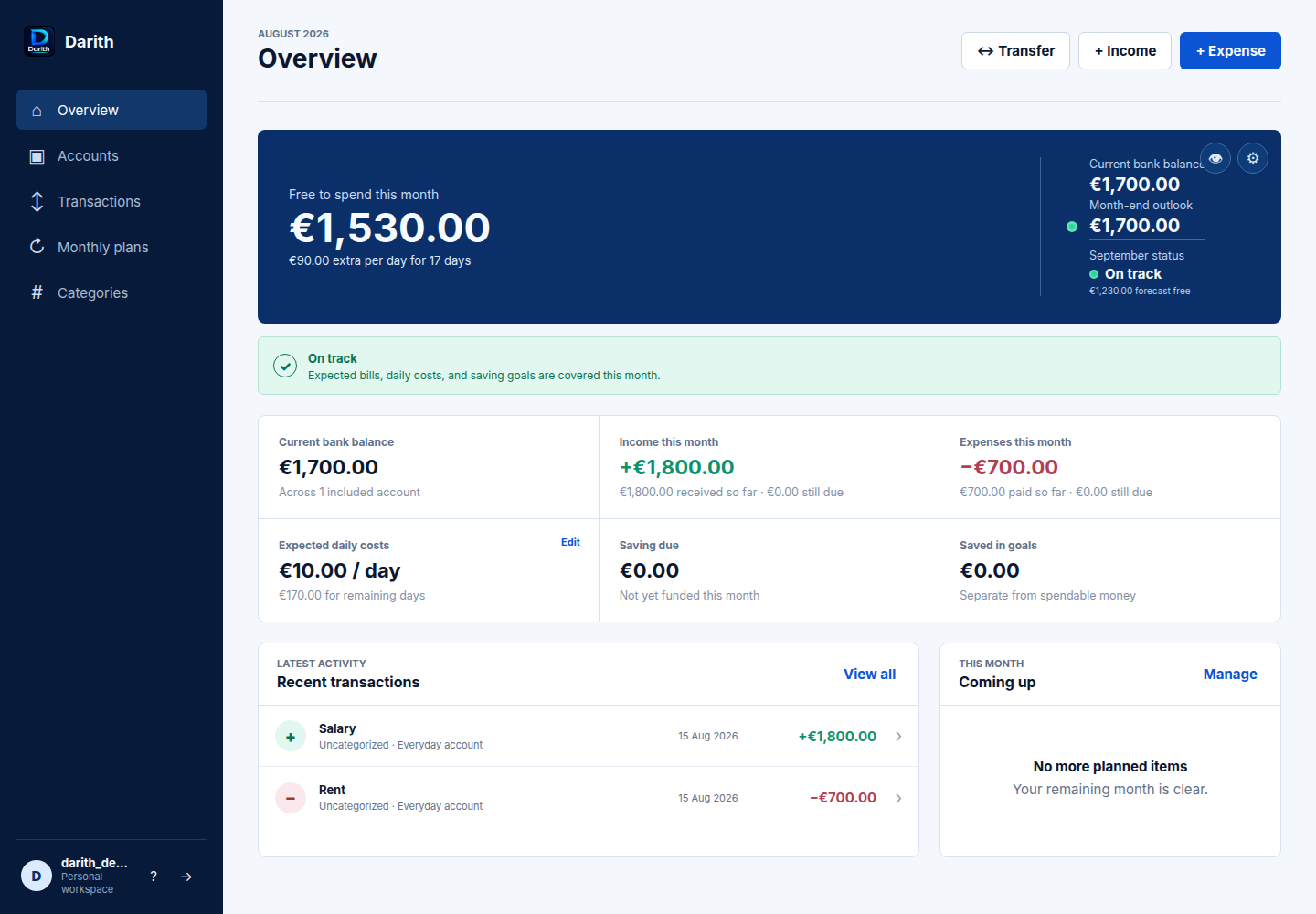
Overview shows the difference between the money in your bank and the money that is safe to spend.
Darith checks each day because income may arrive after an expense. Money is not treated as available before it arrives. This helps Darith find days when your money could become too low, even if the whole month looks fine.
Budget status
Your plan looks good and you have some extra money you can safely spend.
Your plan is still okay, but there is only a small amount of extra money.
Darith expects your money to become too low on a future day. Check your income, expenses, savings, or daily spending.
The six detail figures
Total across included accounts.
Income already received plus repeating income still due.
Expenses already paid plus repeating expenses still due.
Your daily estimate and its total for the remaining days.
This month's goal contributions that have not yet been funded.
Total money kept in active saving goals. It is separate from money you can spend.
Activity, reminders, and coming up
Recent transactions: This section shows the latest entries. Coming up: This section shows repeating income and expenses due later this month. Fund your goals: When a goal contribution is ready, this section shows the amount and source account; Mark saved creates a real transfer into the goal.
The eye button hides financial values across the dashboard and remembers that choice for your user. The gear button opens Settings.
Where money lives
Accounts
Create an account with a name and its current balance. Income, expenses, and transfers update this balance automatically.
Use these for money available to your monthly budget. Their balances and connected plans affect Overview.
Turn off Include in monthly budget for money you want to record but do not want Darith to use in safe-to-spend checks.
Each saving goal has its own balance in Accounts. Money in a saving goal is not counted as money you can spend.
Select the three-dot button on an account to rename it, correct its current balance, change its budget inclusion, or remove it. Removing a bank account keeps transaction history, but an account still used by a transfer or goal may need those links changed first.
What already happened
Transactions
Add money that has already arrived. Choose its description, amount, date, category, and destination bank account.
Record money already spent. Darith subtracts it from the selected bank account.
Move money between bank accounts and saving goals. The source must have enough money.
Download your Darith data in a spreadsheet-friendly file for your own records or analysis.
Manual transactions and transfers represent completed activity, so they cannot be dated in the future. Use Plans for future income and expenses.
Editing and deleting
Select a transaction to edit or remove it. When you edit a transaction, Darith removes the old change and applies the new one. In Settings > Transactions, choose what deletion does:
- Update balances automatically: deleting an expense restores its amount; deleting income removes its amount; deleting a transfer restores both sides.
- Leave balances unchanged: only the activity record is removed, and you correct account balances yourself if needed.
Deleting one item from a monthly plan skips only that item. Future months stay planned.
What should happen later
Plans
Plans are for income and expenses you expect later. Choose Once, Daily, Weekly, or Monthly. Darith uses the plan in its checks but does not change your balance until you confirm what happened.
Add salary or other expected income. Choose how often it repeats, the first date, optional final date, category, and receiving account.
Add rent, bills, subscriptions, appointments, trips, or other expected costs. Choose Once, Daily, Weekly, or Monthly.
You can move, change, or skip one planned item without changing the main plan. For example, move only this month's salary to tomorrow.
When a planned date arrives, Darith asks if it happened. Mark it done to update the account, move it to another date, or skip only that item.
Editing a plan changes its future dates. Confirmed transactions stay in Activity. Deleting a plan stops future items but keeps past activity.
Money with a purpose
Saving goals
Create a goal in one of two ways:
Enter a fixed monthly amount, such as 400 each month. Darith reserves that amount until the goal is funded.
Enter a target amount and target date. Darith calculates the monthly contribution needed from the amount still remaining.
Also enter anything already saved, the first monthly saving date, and a default funding account. The goal then has a separate balance shown in Accounts.
How funding works
- Darith includes the planned saving in its money checks before the saving date.
- When the date arrives, confirm it to move the money into the goal and record the transfer.
- You can change the amount or date for only this month, or skip this month. The main saving goal stays the same.
- Each goal is recorded at most once for a month, and the confirmed transfer appears in Activity.
Move its remaining balance back to a bank account first. Darith only removes a goal account when its balance is zero, and keeps its transfer history.
Keep activity understandable
Categories
Income and expense categories are separate. Darith starts each user with practical defaults, and you can add, rename, or remove your own. Categories make the activity list easier to read and are included in the CSV export.
Each user's categories are private to that user. Removing a category does not remove the related transaction; the transaction remains in Activity without that category.
Make Darith yours
Settings
Appearance
JPEG, PNG, or WebP up to 2 MB and 1200 by 1200 pixels.
Ocean, Forest, Graphite, or Purple. The choice is saved only for your user.
EUR, USD, GBP, CHF, CAD, AUD, or Iranian Toman (IRT). This is display formatting, not currency conversion.
Choose English, Persian, Italian, French, Spanish, Dutch, German, or Portuguese. Darith saves the choice to your account, and Persian uses a right-to-left layout.
You can add one private GIF for Good, Tight, and Not enough. Each is limited to 2 MB, 1200 by 1200 pixels, and 300 frames. A new upload replaces the previous file, and Remove GIF clears it.
Planning
Money Darith always keeps aside. The default is 0.
Choose Current month, or 1, 2, or 3 future months for Money by day. This does not change the current-month blue card.
The day-by-day slider is off by default. Turn it on in Planning when you want to use it.
Transactions
Choose if deleting a transaction changes the account balance back, or leaves the balance as it is.
Security
Choose Off, 1, 5, 15, or 30 minutes. Darith locks after you do not use it for that time.
Create a 4 to 8 digit PIN for unlocking. The saved value is securely hashed rather than stored as readable digits.
Add a passkey to unlock with your device's fingerprint, Face ID, screen lock, or security key. Passkeys require HTTPS and a supported browser.
Your device checks your fingerprint or face. Darith only receives a yes/no result, not your fingerprint or face data.
Before turning on auto lock, add at least one way to unlock Darith. Keep a working PIN or passkey before removing your last available method.
Account
The Account tab can permanently delete your Darith user and live data. To delete your account, enter your password, tick the confirmation box, type the text shown on screen, and confirm one last time. This action cannot be undone; encrypted historical backups may remain until normal backup rotation removes them.
Control and trust
Privacy, data, and feedback
Darith never asks for your online banking username, password, card number, or bank API access. You enter only the financial information you choose.
Accounts, transactions, categories, goals, settings, profile images, and GIFs are scoped to the signed-in user. Other users cannot view them.
darith.app uses HTTPS for data in transit and supports encrypted database and media backups. The server operator still has technical access for maintenance; Darith is not end-to-end encrypted.
Use Export CSV when you want a copy of your data. Use Feedback in the dashboard to send a comment to the operator; only the message, page context, and your account identity are sent.
Ways to use Darith
Free locally or hosted online
Individuals can run Darith on their own computer for free using the local setup instructions on GitHub. A new hosted account receives 20 Darith Credits after email verification; 100 credits or a verified €1 payment unlocks one month of hosted access.
Hosted payments are manual. Pay through the listed method, report the payment from Billing, and an administrator verifies it and sets your access date. Darith does not collect payment card or bank credentials.